Blog · Updated on 29 June 2026
Make Your WordPress Site Accessible: BFSG Duty, WCAG & the Best Plugins (2026)
Since the BFSG, WordPress accessibility is mandatory for shops and businesses. Make your site accessible: BFSG basics, WCAG and the best plugins.

Since the German Accessibility Strengthening Act (Barrierefreiheitsstärkungsgesetz, BFSG), digital accessibility is no longer optional for many businesses – it is a legal duty. As of 28 June 2025, online shops and many service websites must be accessible, or they risk warnings and fines. In this updated guide (2026) I show you what the BFSG means for your WordPress site, which WCAG basics matter, and which plugins help you implement accessibility in practice.
What is the BFSG – and who does it affect?
The BFSG implements the EU’s European Accessibility Act in Germany. It requires businesses to offer certain digital products and services in an accessible way. This is particularly relevant for online shops and e-commerce – including your WooCommerce shop – as well as booking and service platforms and many company websites that conclude contracts.
- Deadline: 28 June 2025 – the obligation is already in force.
- Who it affects: primarily online shops and providers of digital services for consumers. (Micro-enterprises with fewer than 10 employees and under €2m annual turnover are partly exempt for services – check the details for your case.)
- Risk: warnings, complaints to market-surveillance authorities and fines.
The foundation: WCAG
The technical benchmark for accessibility is the Web Content Accessibility Guidelines (WCAG), usually conformance level AA. Their four principles: content must be perceivable, operable, understandable and robust – e.g. sufficient colour contrast, full keyboard operability, meaningful alt text for images, a clear heading structure, and clear labels for forms.
In an increasingly digital world, it is of the utmost importance that your website is accessible to all users. According to the German Federal Statistical Office, about 7.8 million people with a recognized disability live in Germany, which amounts to roughly 9.4% of the total population. Many of these people rely on assistive technologies to navigate the web, which makes the design and development of accessible websites essential.
This is where WordPress accessibility plugins come into play. These tools are designed to help website owners and developers make their sites more accessible and thereby improve the user experience for everyone.
In this comprehensive guide, we take a look at the top 9 WordPress accessibility plugins.
WP Accessibility
WP Accessibility is a free plugin that offers a range of features to solve common accessibility issues in WordPress. The plugin lets you enable or disable various accessibility features through a simple settings menu, with no coding knowledge required.
One of its standout features is the addition of skip links to your website. Skip links allow users to jump to different sections of a page, bypassing unnecessary content such as navigation menus. This is especially useful for users who rely on screen readers or keyboard navigation.
Another great feature of WP Accessibility is the ability to add prominent outlines around focusable elements on your website, such as links, buttons and text input fields. This helps users identify the current focus on the page.
In addition, WP Accessibility lets you set the language of your pages for correct pronunciation by screen readers, add long image descriptions, remove redundant title attributes and much more.
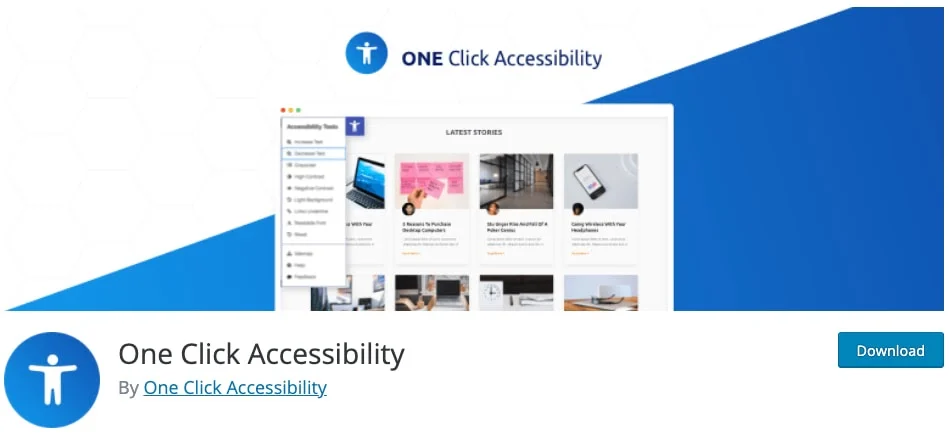
One Click Accessibility
One Click Accessibility is another free WordPress accessibility plugin that is easy to set up and offers a range of user-friendly modifications for your website. The plugin provides basic improvements to increase WordPress accessibility, such as skip links, focus outline and ARIA landmarks. It also removes the target attribute from links to prevent them from opening in a new tab, which can be disorienting for some users. A particularly important feature is the accessibility toolbar, which allows users to underline links, change font sizes, enable high and negative contrast and link to a sitemap and help pages.
wA11y
wA11y is a free plugin that includes tools for assessing and improving the accessibility of your website. It comes with two main features, TOTA11Y and WAVE. TOTA11Y is an accessibility toolkit from Khan Academy that visualizes how well your website accommodates assistive technologies, while WAVE is a popular accessibility evaluation tool that identifies accessibility issues on any live website.
accessiBe
accessiBe is a premium service that uses AI technology to scan your website for accessibility issues and make the necessary adjustments. The AI analyzes whether your website is accessible with WordPress by improving page elements such as alt tags, ARIA attributes, icons, buttons and forms in order to optimize the user experience.
accessiBe also changes the structure of your pages to make them more navigable via the keyboard and performs daily scans for content changes. It is a subscription-based service with four monthly plans starting at $49 per month, all of which offer a seven-day free trial.
UserWay
UserWay is a premium accessibility service that uses automation to improve the accessibility of your website. Like accessiBe, UserWay’s AI also scans your site for accessibility issues, particularly with regard to keyboard navigation.
UserWay also offers a free widget that enables basic accessibility adjustments to your website. Users can control colors and color contrast, keyboard navigation, focus and more through this widget.
UserWay is a subscription-based service with three monthly plans starting at $49 per month.
WP Accessibility Helper
WP Accessibility Helper is a freemium plugin that offers a range of features that can be enabled or disabled via your WordPress dashboard. Users can change the font size, change colors for better contrast, underline and highlight links and disable animations and page styling.
The Pro version of the plugin, available from $99 for a single license, offers additional benefits such as accessible pop-ups and widgets, accessibility help buttons and support for WPML and PolyLang.
Accessibility Widget
Accessibility Widget is a free plugin that adds an accessibility panel to your website. This panel allows users to change the font size on the screen. This minimal plugin works on both desktop and mobile screens, and you can select your text sizes and the page elements affected.
WP Accessibility Tools & Missing Alt Text Finder
WP Accessibility Tools & Missing Alt Text Finder – this free plugin comes with a missing alt text finder that searches your media library, pages and posts for images without alt text and lets you easily add it and make your WordPress accessible. It also includes a contrast ratio checker to ensure that your pages meet the ADA requirements.
This free plugin features a finder for missing alt texts that searches your media library, pages and posts for images without alt text and makes it easy for you to add it. It also includes a contrast ratio checker to ensure that your pages meet the ADA requirements for color contrast, as well as an interactive checklist of the WCAG accessibility requirements.
WP ADA Compliance Check Basic
Unlike our previous recommendations, WP ADA Compliance Check Basic is a free plugin that scans your website for accessibility issues rather than making changes. It checks for violations of Section 508 and the WCAG 2.1 LEVEL A/AA web accessibility standards and generates reports with guidance on how to fix them.
The premium version of the plugin provides automatic improvements to your website and removes certain limitations of the free version.
Accessibility Press
Accessibility Press is a simple but effective plugin that adds an accessibility toolbar to your website. This toolbar, designed to be user-friendly, offers options for grayscale, underlining links, zoom control, custom cursors and font size control. In addition, this plugin supports most languages, making it a great choice for international companies.
WordPress Accessibility – Make It a Priority
Accessibility is not a „nice-to-have feature“ but a critical aspect of any website. By making your website more accessible, you not only meet legal requirements and ethical best practices, but also ensure that your website can be enjoyed by all users, regardless of their abilities or limitations.
Bear in mind that while these WordPress accessibility plugins can help you make significant progress in improving the accessibility of your website, they are not a cure-all. It is essential to continuously evaluate and improve the accessibility of your website as part of your ongoing website maintenance and development process.
By prioritizing accessibility from the very beginning, you take a significant step toward creating a more inclusive web experience for all users. And in doing so, you demonstrate your commitment to equality and inclusion, which can only enhance your brand reputation and appeal.
Six steps to an accessible WordPress site
- Choose an accessible, WCAG-compliant theme (semantic HTML, visible focus styles).
- Check colour contrast (text to background at least 4.5:1) and fix it.
- Ensure full keyboard operability (visible focus, logical order).
- Add meaningful alt text to all informative images.
- Mark up forms with clear labels, understandable error messages and ARIA – especially in the checkout.
- Test with tools like WAVE, axe or Lighthouse, and additionally verify with real assistive technology (screen reader, keyboard only).
Meet the BFSG requirement – without the stress
Accessibility is not a one-off project but part of ongoing, solid website maintenance. If you run a shop or company website on WordPress or WooCommerce, I audit your site for BFSG and WCAG compliance, implement the necessary changes, and keep it accessible long-term as part of my WordPress maintenance.
Want it implemented properly? I build your accessible website to BFSG.